API Quickstart
Create a key, authenticate, find work, create a task, and get the AI read on a thread — in five minutes. Examples in curl, JavaScript, C# and Python throughout.
Plan requirement: API access is included from the Business plan. On other plans key creation is unavailable and requests return 403 subscription_required.
1. Get an API key
In the Sortd app, open Settings (the cog, bottom-left) and select the API tab — name the key and click Generate. Pick the scopes it needs — they are the key's entire capability, checked on every request. For this quickstart: tasks.read, tasks.write, boards.read, lists.read, ai.classify.
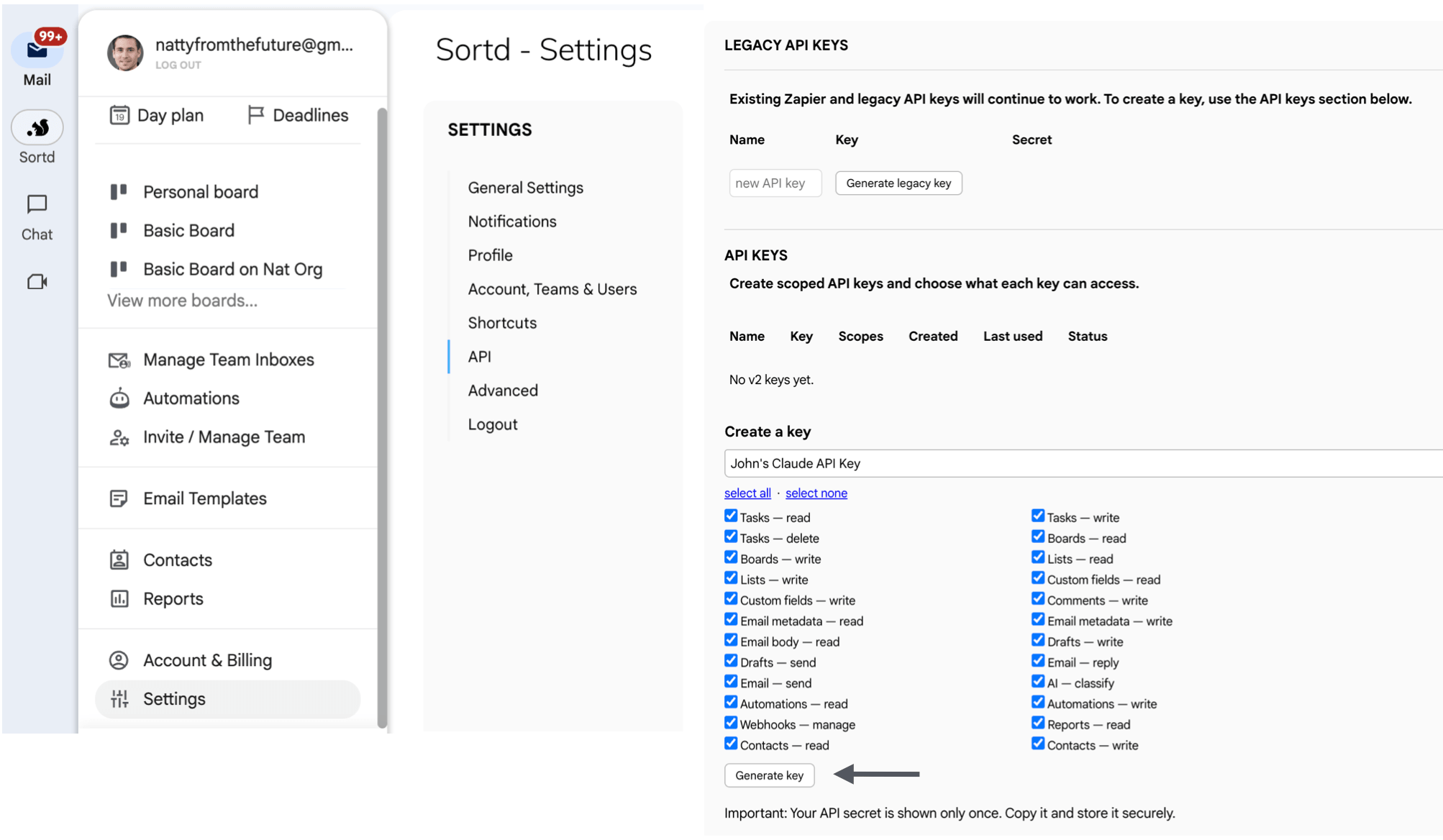
The secret — sk_live_… — is shown once; copy it now and store it like a password (server-side only, never in a browser or a repo). The key acts for the team you created it in; the owner needs access to that team and an active subscription. Full detail: Authenticate & verify.
2. Authenticate
Send the key as a Bearer token on every request. GET /me needs no scopes, so it's the quickest check that the key works — it echoes who you are and which scopes the key carries.
curl
curl "https://api.sortd.com/v2/me" -H "Authorization: Bearer sk_live_…"JavaScript (fetch)
const res = await fetch("https://api.sortd.com/v2/me", {
  headers: { Authorization: "Bearer sk_live_…" },
});
const { data } = await res.json();
console.log(data.email, data.key.scopes);
C# (HttpClient)
using var client = new HttpClient();
client.DefaultRequestHeaders.Authorization =
    new AuthenticationHeaderValue("Bearer", "sk_live_…");
var me = await client.GetStringAsync("https://api.sortd.com/v2/me");
Python (requests)
import requests
me = requests.get(
    "https://api.sortd.com/v2/me",
    headers={"Authorization": "Bearer sk_live_…"},
).json()["data"]
Responses are always { "data": …, "meta": { "request_id": … } }. Lists add meta.pagination.
3. Walk the hierarchy
Teams → boards → lists. IDs are opaque and prefixed (brd_, lst_, tsk_).
curl
curl "https://api.sortd.com/v2/teams" -H "Authorization: Bearer sk_live_…"
curl "https://api.sortd.com/v2/boards?team_id=TEAM_ID" -H "Authorization: Bearer sk_live_…"
curl "https://api.sortd.com/v2/boards/brd_…/lists" -H "Authorization: Bearer sk_live_…"
JavaScript (fetch)
const H = { Authorization: "Bearer sk_live_…" };
const teams  = (await (await fetch("https://api.sortd.com/v2/teams", { headers: H })).json()).data;
const boards = (await (await fetch(`https://api.sortd.com/v2/boards?team_id=${teams[0].id}`, { headers: H })).json()).data;
const lists  = (await (await fetch(`https://api.sortd.com/v2/boards/${boards[0].id}/lists`, { headers: H })).json()).data;
C# (HttpClient)
var teams  = await client.GetStringAsync("https://api.sortd.com/v2/teams");
var boards = await client.GetStringAsync("https://api.sortd.com/v2/boards?team_id=TEAM_ID");
var lists  = await client.GetStringAsync("https://api.sortd.com/v2/boards/brd_…/lists");
Python (requests)
import requests
H = {"Authorization": "Bearer sk_live_…"}
teams  = requests.get("https://api.sortd.com/v2/teams", headers=H).json()["data"]
boards = requests.get("https://api.sortd.com/v2/boards", headers=H, params={"team_id": teams[0]["id"]}).json()["data"]
lists  = requests.get(f"https://api.sortd.com/v2/boards/{boards[0]['id']}/lists", headers=H).json()["data"]
4. Find and create work
List tasks (cursor-paginated — also board-wide with ?board_id=brd_…, or across every board you can access with no filter at all), then create one. An Idempotency-Key makes retries safe — the same key returns the same task instead of creating a duplicate. New tasks land at the top of the list by default; pass "position": "bottom" or "after_task_id": "tsk_…" to place them (see ordering tasks).
curl
curl "https://api.sortd.com/v2/tasks?list_id=lst_…&limit=20" -H "Authorization: Bearer sk_live_…"

curl -X POST "https://api.sortd.com/v2/tasks" \
  -H "Authorization: Bearer sk_live_…" \
  -H "Content-Type: application/json" \
  -H "Idempotency-Key: 7c1f-…" \
  -d '{"list_id":"lst_…","title":"Follow up with Acme","notes":"Sent pricing"}'
JavaScript (fetch)
const res = await fetch("https://api.sortd.com/v2/tasks", {
  method: "POST",
  headers: {
    Authorization: "Bearer sk_live_…",
    "Content-Type": "application/json",
    "Idempotency-Key": crypto.randomUUID(),
  },
  body: JSON.stringify({ list_id: "lst_…", title: "Follow up with Acme" }),
});
const { data: task } = await res.json();
C# (HttpClient)
client.DefaultRequestHeaders.Add("Idempotency-Key", Guid.NewGuid().ToString());
var content = new StringContent("""
{ "list_id": "lst_…", "title": "Follow up with Acme" }
""", Encoding.UTF8, "application/json");
var created = await client.PostAsync("https://api.sortd.com/v2/tasks", content);
Python (requests)
import requests, uuid
task = requests.post(
    "https://api.sortd.com/v2/tasks",
    headers={
        "Authorization": "Bearer sk_live_…",
        "Idempotency-Key": str(uuid.uuid4()),
    },
    json={"list_id": "lst_…", "title": "Follow up with Acme"},
).json()["data"]
To create a task from an email — title from the subject, thread linked — send thread_id instead of title (needs email.metadata.read too): the create-a-task guide shows both forms in all four languages.
5. Get the AI read on a thread
Classification is cached-or-enqueue: a cached result returns instantly; otherwise you get 202 with a poll URL. Sortd's pipeline classifies mail that's on a board — so task the thread first (step 4), or see the classification guide for the full flow and its limits.
curl
curl -X POST "https://api.sortd.com/v2/ai/classify-thread" \
  -H "Authorization: Bearer sk_live_…" \
  -H "Content-Type: application/json" \
  -d '{"thread_id":"…"}'
# -> 200 with the analysis, or 202 with { "job_id": "job_…", "poll_url": … }
JavaScript (fetch)
const res = await fetch("https://api.sortd.com/v2/ai/classify-thread", {
  method: "POST",
  headers: { Authorization: "Bearer sk_live_…", "Content-Type": "application/json" },
  body: JSON.stringify({ thread_id: "…" }),
});
const { data } = await res.json();
// 200 -> data is the analysis; 202 -> data has { job_id, poll_url } — poll it (10–30s)
C# (HttpClient)
var content = new StringContent("""{ "thread_id": "…" }""", Encoding.UTF8, "application/json");
var res = await client.PostAsync("https://api.sortd.com/v2/ai/classify-thread", content);
// 200 -> the analysis; 202 -> poll the returned poll_url until ready (10–30s)
Python (requests)
res = requests.post(
    "https://api.sortd.com/v2/ai/classify-thread",
    headers={"Authorization": "Bearer sk_live_…"},
    json={"thread_id": "…"},
)
data = res.json()["data"]
# 200 -> the analysis; 202 -> data["poll_url"] — poll until ready (10–30s)
Errors & scopes
Errors are { "error": { "code", "message", "request_id" } } with stable codes — scope_insufficient,
subscription_required, rate_limited, idempotency_conflict. A scope_insufficient error names the missing scope in details.required — fix the key's scopes rather than retrying.
Next
- API guides — create & order tasks, drafts & sending, webhooks, all with curl / JavaScript / C# / Python
- Connect an AI assistant over MCP — Claude, Cursor and friends driving Sortd directly
- Full API reference (with a built-in "Try It")
- llms-full.txt — the whole contract for your AI tools