AI CLI & key-based clients
CLIs, editors and headless agent runners connect to the same hosted MCP server as the apps — but through a config file or a header instead of a settings screen. Most of them authenticate with an API key; Claude Code can do either. Using Claude or ChatGPT the apps? That's Connect your AI.
1. Create an API key
Plan requirement: API keys and MCP access are included from the Business plan — on other plans the Settings screen won't offer key creation.
In the Sortd app, open Settings (the cog, bottom-left) and select the API tab — name the key and click Generate. The scopes you tick play the same role as the OAuth consent screen: the assistant only ever sees the tools those scopes allow, and the server enforces them again on every call. The secret (sk_live_…) is shown once; store it now.
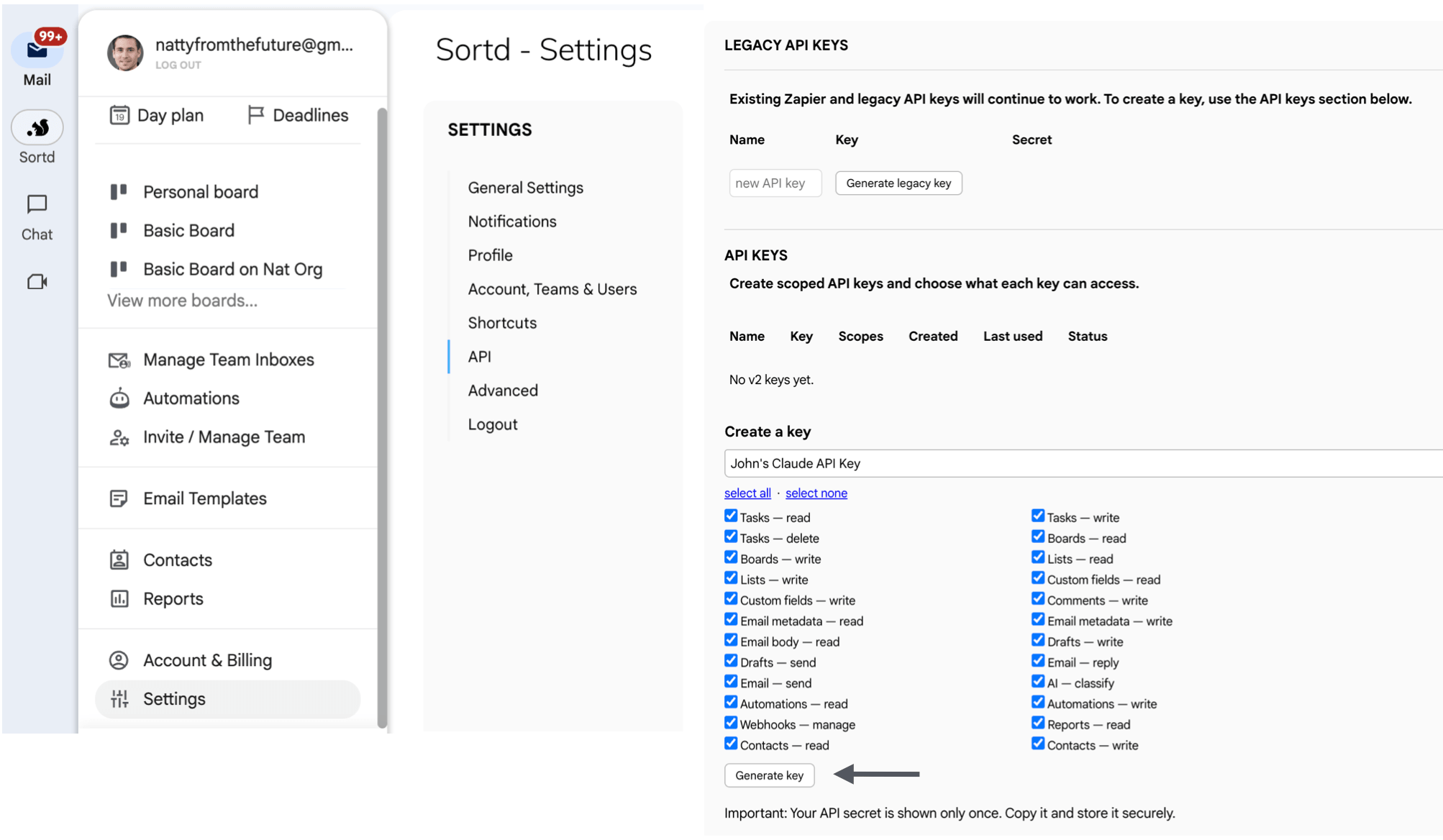
A sensible starter set for an assistant: tasks.read, tasks.write, boards.read, lists.read, email.metadata.read, ai.classify, and drafts.write if it should prepare replies. Sending has its own ladder — see Drafts & sending.
Key hygiene: a key is a password — server-side and config files only, never a browser or a repo. Scoped to the job (a triage runner doesn't need send scopes), one key per client so revoking one doesn't break the rest, revoke from the same Settings → API screen.
2. Connect your client
Claude Code (CLI)
Interactive use can skip the key entirely — OAuth like the apps:
claude mcp add --transport http sortd https://api.sortd.com/mcpRun /mcp in a session to complete the browser sign-in and see the connection and its tools. For headless or scripted use, pass the key instead:
claude mcp add --transport http sortd https://api.sortd.com/mcp \
  --header "Authorization: Bearer sk_live_…"
Cursor (.cursor/mcp.json)
{
  "mcpServers": {
    "sortd": {
      "url": "https://api.sortd.com/mcp",
      "headers": { "Authorization": "Bearer sk_live_…" }
    }
  }
}
Any other MCP client (JSON config)
{
  "mcpServers": {
    "sortd": {
      "type": "http",
      "url": "https://api.sortd.com/mcp",
      "headers": { "Authorization": "Bearer sk_live_…" }
    }
  }
}
Clients with built-in OAuth support can omit the header and complete the Connect Sortd sign-in instead.
Agent runners & workflow platforms
Hosted runners (n8n, Make, Pipedream, self-hosted agents) usually talk to Sortd two ways, both key-authenticated:
How keys behave on the MCP endpoint
- Same tools, same rules: a key sees exactly the tools its scopes allow — the AI Reference vocabulary and the scope catalog apply unchanged.
- No browser, no consent screen: the key's tick-boxes are the consent. That's what makes keys right for headless runs — and why they deserve tighter scopes.
- Sessions still apply: key-connected clients appear in the session list like any OAuth client, and can be revoked the same way.
- Retries are safe: write tools accept an
idempotency_key— give scripted runs one per operation so a retry never duplicates a send or a task.
Next: verify the connection with "Which Sortd boards can you see?", learn the vocabulary in the AI Reference, or put the runner on a schedule.